
Click here to view the ACS library of printable Rodent Training Technique PDFs.
FAQs
1. What should I wear to Training?
Close-toed shoes are required at all times in the vivarium. Students are encouraged to wear long pants and restrain long hair. ACS will provide all PPE needed for rodent handling.
2. Can I bring food or drinks into the laboratory?
No. Food and drink are not allowed in the vivarium.
3. Can I take videos or photos of training?
No. ACS does not allow photos or videos without prior approval.
4. How do I register for training classes?
Registration for modules and wet labs occur in myTraining or through a Special Training Request. You can click the links in the table above or after logging into myTraining, click the search icon at the top right hand corner of the screen. Enter the ACS# or name of the class you would like to register for and the system will automatically populate matching courses. For wet labs that require a Special Training Request to sign up, please include the Wet Lab title you would like to register for in the “Training Requested” box.
5. Is there a fee for training classes?
Training classes are offered by ACS at no cost.
Training courses are free; however, if you do not show up for a wet lab, cancel within 24 business hours of a wet lab, or arrive more than 10 minutes after the wet lab start time, a cancelation fee of $100 will be billed to your lab’s protocol. If you cannot attend a wet lab you registered for email the ACS Training Team. *No-show/cancelation fees are NOT payable from Contract/Grant funding (funds 201 or 209).
6. What should I do if I am unable to attend a wet lab I have registered for?
You will need to cancel your class through myTraining. If you are trying to cancel a class with less than 48hour of its start time, please email the training team at acstrainingrequests-l@lists.ufl.edu.
7. Where do I go for hands-on training?
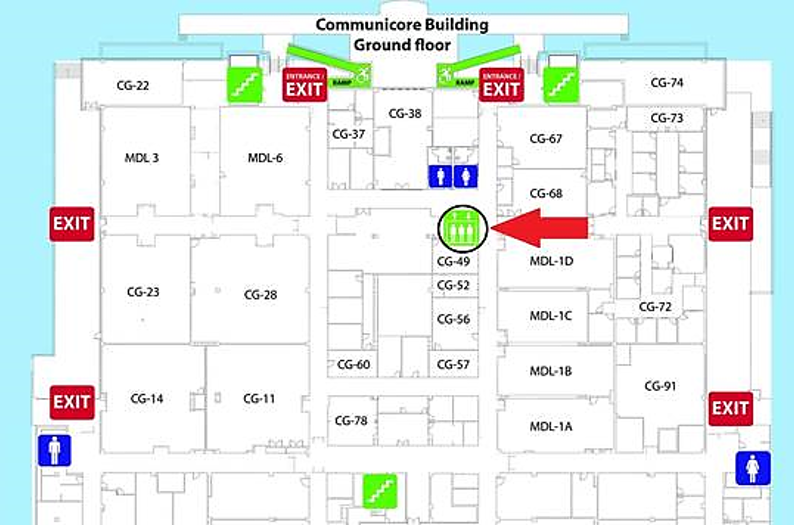
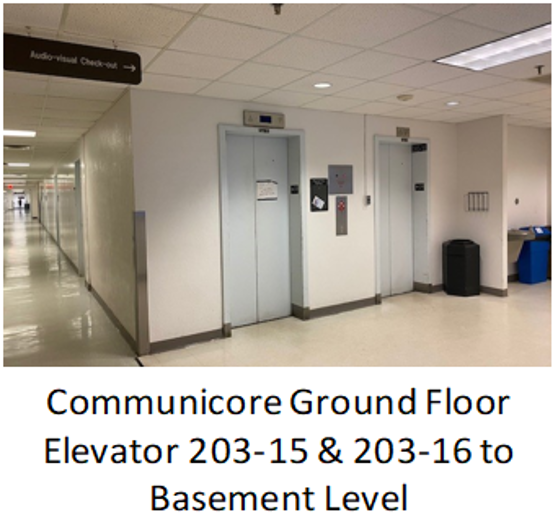
Please meet at the Communicore building basement elevator lobby. To locate the elevator lobby, you will need to enter the Communicore building ground floor and take the 203-15 or 203-16 elevators to the basement level (please see map and pictures below).
8. What should I do when I arrive at the Communicore basement?
Once you arrive, please wait in the elevator lobby outside the facility for the training team to meet you. Please do not enter the facility; all students will be met by a trainer in the elevator lobby. If you are unfamiliar with the Communicore building, we recommend locating the lobby prior to your scheduled class. If you have trouble finding us, please call the ACS training office at (352) 273-7667 for assistance.